Turn Google Maps Into a Lead Generation Machine
A list is an event, a machine is a schedule. The five parts that turn Google Maps prospecting into something that runs every week without a decision.
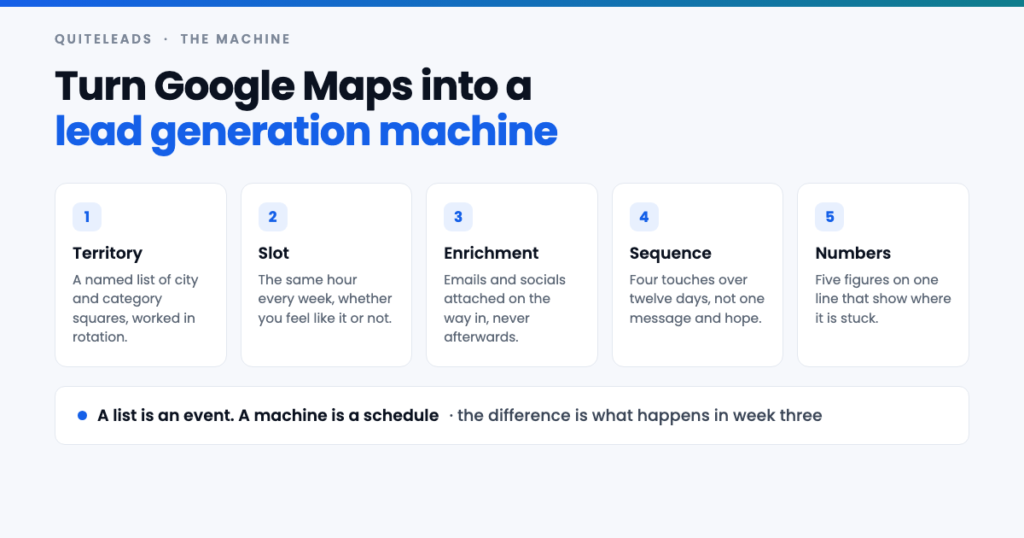
A machine is five parts that keep running whether or not you feel like prospecting.
Short answer: a list is an event, a machine is a schedule. Turning Google Maps into a lead generation machine means fixing four things once — a territory you rotate through, an hour in the calendar, a four-touch sequence, and five numbers you write down every Friday — so that next month’s pipeline gets built whether or not you feel like prospecting that week.
Key takeaways
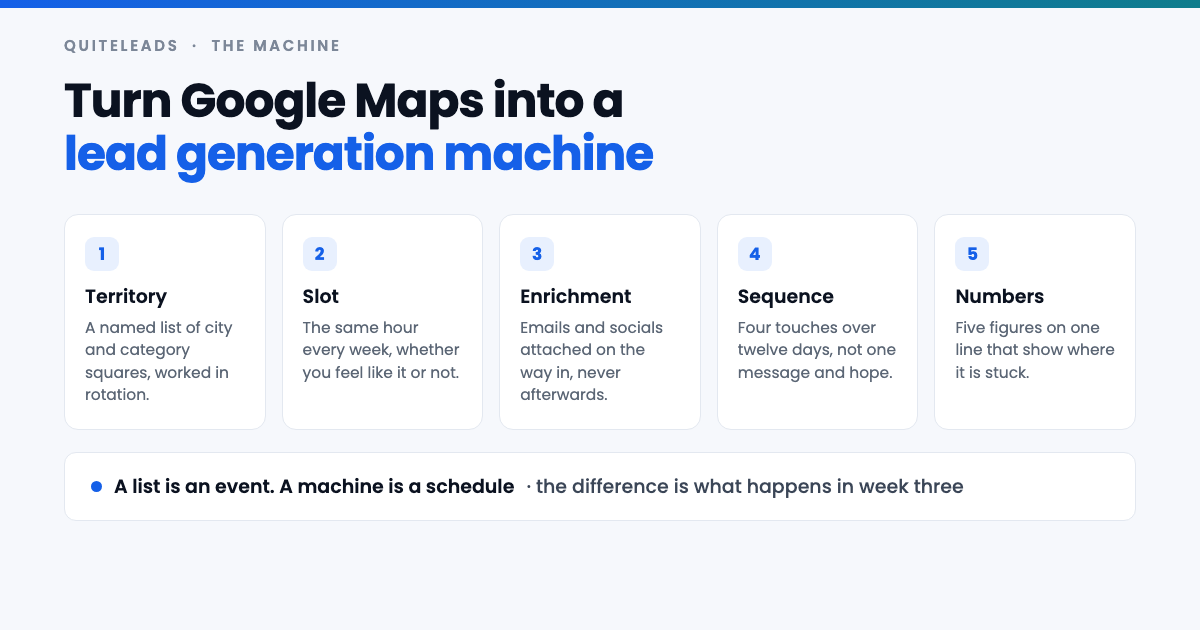
- A list is an event. A machine is a schedule. The difference shows up in week three, not week one.
- Territory beats volume. Eight squares worked in rotation outlast one five thousand row dump.
- Enrich on the way in. Rows you plan to come back to are rows you never contact.
- Four touches over twelve days. Most replies arrive on the second and third, not the first.
- Five numbers on one line, every Friday. Where the number collapses tells you what to fix.
Table of contents
Why one-off lists stop working
The story is almost always the same. Someone spends a Saturday on Google Maps, ends up with two thousand rows, sends a few hundred messages over the following fortnight, gets a dozen replies and closes a client. It works. Then nothing happens for six weeks, because the list is spent and rebuilding it means finding another Saturday.
Three things break at once when you work that way. The list burns after a single pass, so the asset you built has no second use. Nothing tells you what to do next, so every restart begins with the question of which city and which category — and a decision you have to make from scratch is a decision you can postpone. And the rows you promised to enrich later never get enriched, so half the list is a name and a phone number you will not call.
None of that is a tooling problem. You can have the best Google Maps lead generation tool on the market and still produce one heroic list a quarter. The fix is structural: stop treating the list as the output, and treat the weekly slot as the output instead.
What a machine actually means here
A machine is not more automation. Plenty of people automate the collecting and still have no pipeline, because the automated part was never the bottleneck. A machine is a system where the same inputs produce the same outputs on a schedule, and where running it next Monday requires no decisions.
That last clause is the important one. Every decision you leave open — which niche this week, which city, which message, whether today is a prospecting day — is a small tax you pay each time, and eventually you stop paying it. So the machine makes those decisions once, writes them down, and then all you do on a Monday is the next thing on the list.
The five moving parts
- Territory. A written list of squares — one category in one area — worked in rotation rather than re-searched.
- Slot. A fixed hour in the calendar, so prospecting does not compete with client work for attention.
- Enrichment. Emails and social handles attached at collection time, never as a second job.
- Sequence. Four touches over twelve days, defined once and reused for every square.
- Numbers. Five figures written on one line each week, which is the entire reporting layer.
Four of the five cost nothing and take an afternoon to set up. Only the third one really benefits from software, and that is the part people usually try to do by hand.
Part one: a territory you rotate through
A square is one category in one area: dentists in Chorlton, roofers in Leeds city centre, independent gyms in Bristol north. It is the smallest unit the machine works with, and it should be small enough to finish in a single collecting slot — roughly one to four hundred listings.
Before you collect anything, write out eight to sixteen squares in a spreadsheet with five columns: square name, search terms, date last worked, rows collected, replies. That sheet is the machine’s memory. It is what removes the weekly decision, and it is what stops you searching the same central postcode four times because it is the one that comes to mind.
Building squares is the same skill as getting past the result ceiling on a single search, which is covered properly in the guide to scraping unlimited leads from Google Maps. The short version: split by district, split by search term, then split by adjacent category — the suppliers and neighbours around your buyer — and deduplicate once at the end so overlapping queries are safe to run.
Treat a square as spent for about ninety days after you work it. After that it has genuinely refilled: businesses open, owners change, websites get rebuilt, and the ones who ignored you in March are running a different quarter in June. Sixteen squares at one a week is a four-month rotation, which means you never run out and never repeat yourself.
Part two: a slot, not a mood
Prospecting is the first thing dropped when client work gets busy, which is precisely when next month’s pipeline is being decided. The only reliable defence is a recurring calendar entry with a name on it, treated like a client call rather than a task on a list.
Split it across the week rather than saving it for one long session. Five short slots survive a bad week; a three-hour Thursday afternoon does not, because the first time something urgent lands on a Thursday the whole machine stops. The split below adds up to two hours and ten minutes, which is a realistic weekly cost for one square.
The unglamorous detail that makes it work: each slot ends in a finished artefact. Monday ends with a clean, enriched list. Tuesday ends with messages sent. Nothing carries over, so nothing accumulates as debt.
Part three: enrichment on the way in
Google Maps gives you a name, a category, an address, a phone number, a website and a review count. It does not give you an email address or a single social handle. Those are published on the business’s own site, one hop away from the listing, and how to follow that hop is the whole subject of extracting contact info and social links from Google Maps.
The rule for a machine is simple: a row is not collected until it is enriched. Never save a raw list of names and phone numbers with a plan to come back for the emails. Enrichment debt is never repaid — you will look at four hundred half-finished rows next Monday, feel the weight of it, and start a fresh search instead.
Keep eight fields and no more: business name, category, area, phone, website, email, primary social handle, review count. Review count is not decoration — it is the cheapest proxy you have for whether a business is active and how seriously it takes its own marketing, and it is what you sort by when the list is longer than your daily sending cap.
Part four: a sequence, not a message
One message to four hundred businesses is not a campaign, it is a coin toss. Define one sequence, once, and run every square through it unchanged.
- Day 0 — the specific opener. One observation about their listing or site, one sentence on what it costs them, one question. No attachment, no calendar link.
- Day 3 — a different angle, not a bump. “Just following up” adds nothing. A second reason to care does: a comparable business, a number, a two-line example.
- Day 8 — a different channel. If the email went unanswered, the Instagram or Facebook account is often run by the owner personally, and gets read.
- Day 12 — close the loop. One line saying you will stop there. It is polite, it is honest, and it reliably produces replies from people who meant to answer and forgot.
Most replies land on touches two and three. That is the single most common reason a Google Maps list appears not to work: it was judged on the first message alone. If you need help with what to actually say, the five hooks hiding in every listing are set out in the playbook for generating leads from Google Maps.
Part five: five numbers on one line
Every Friday, write five figures next to the square you worked: collected, reachable, contacted, replied, booked. That is the whole reporting layer, and it takes ten minutes because the numbers are already in front of you.
Their value is diagnostic. Where the sequence collapses tells you which part is broken, and each break has a different fix.
- Collected is low — the square was too narrow, or the search terms were too specific. Widen the terms, not the area.
- Reachable is low — you picked a category that does not publish contact details. Change the category, not the message.
- Contacted is low — you did not run the slot. This is the most common failure and the only one that is purely about calendar discipline.
- Replied is low — the message is wrong, or you stopped at touch one. Fix the opener before you touch anything else.
- Booked is low but replies are healthy — the offer is wrong, not the prospecting. No amount of extra volume fixes this one.
What a running week looks like
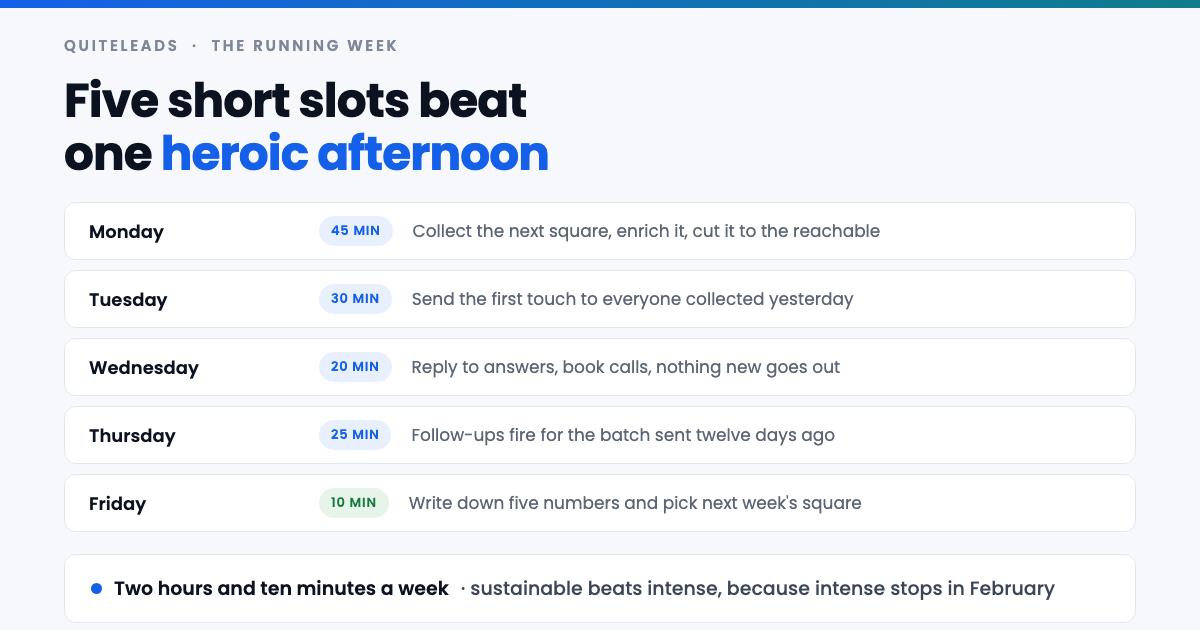
| Day | Time | What happens | What it ends with |
|---|---|---|---|
| Monday | 45 min | Collect the next square, enrich it, cut the chains and the unreachable | A clean list, ready to send |
| Tuesday | 30 min | First touch goes out, paced under your daily cap | Messages sent, nothing queued |
| Wednesday | 20 min | Answer replies and book calls — no new sending | An empty inbox and a fuller diary |
| Thursday | 25 min | Touches two, three and four fire for earlier batches | The sequence stays on schedule |
| Friday | 10 min | Write the five numbers, pick next week’s square | Next Monday needs no decisions |
Wednesday is the slot people delete first, and it is the one that pays. Replies that sit unanswered for three days convert at a fraction of replies answered the same morning, and a booked call is the only output of this entire machine that matters.
Sizing the machine to the clients you need
Volume targets pulled out of the air are why most prospecting feels endless. Work backwards from the number of clients you actually need instead, and the required volume turns out to be smaller and duller than expected.
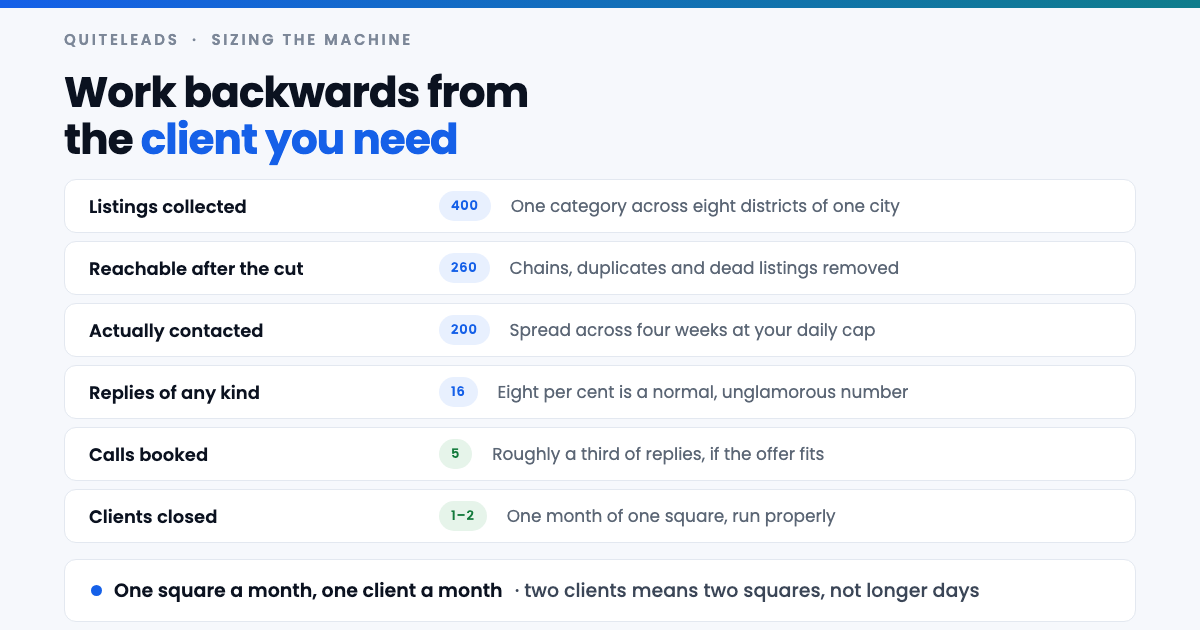
Those are planning figures, not promises — replace each one with your own after two months of the Friday line. But the shape holds: four hundred collected listings across a month of squares supports one to two new clients, which for most freelancers and small agencies is the whole year solved.
The useful consequence is that wanting two clients a month means two squares a month, not longer days. Every part of the machine scales by adding territory, and territory is the one input you have an effectively unlimited supply of.
Wiring it up in QuiteLeads
You can run all of this with a spreadsheet and a lot of copying and pasting. What software buys you is the Monday slot: collecting and enriching four hundred listings by hand is an afternoon, and an afternoon is the thing that does not happen every week.
QuiteLeads is a browser panel that sits alongside the page you already have open, and it maps onto the five parts fairly directly.
- Find — a Google Maps search takes a What and a Where, which is exactly one square. Emails and social handles are read from each business’s own site as it collects, so enrichment happens on the way in rather than as a second job.
- Skip ones already found — the setting that makes rotation safe. A second pass over an overlapping square adds new names instead of collecting the same businesses twice.
- Leads — shows how many of the list are reachable on each channel before you spend a message, which is your “reachable” number without counting anything by hand.
- Saved audiences — one saved audience per square. That is your territory sheet, stored where you work rather than in a tab you forget.
- Outreach — the sequence runs from the same panel across email, Instagram, WhatsApp, Facebook, LinkedIn, X and TikTok, with delays and a daily cap you set rather than the pace a tool picked for you.
Pricing is $49 once, for life, with every feature included and CSV or JSON export at any point, so the list stays yours if you ever move on. If you are still comparing options, the buying checklist for a Google Maps lead scraper is a better place to start than a feature grid.
Keeping the list from rotting
A machine that runs every week accumulates data, and data decays at different speeds. Addresses and phone numbers are stable for years. Websites, email addresses and owners are not, and a contact you collected eighteen months ago is closer to a guess than a fact.
- One master list, deduplicated on website domain and phone number. Business names are spelled inconsistently; domains are not.
- A permanent suppression list. Anyone who asks not to be contacted goes on it once and is filtered out of every future square, forever.
- Re-collect rather than re-use. When a square comes round again, collect it fresh and let deduplication tell you what is genuinely new. Old rows are a record, not an audience.
- Mark the outcome, not just the send. Replied, not interested, wrong contact, closed. Four states are enough, and they are what make the second pass smarter than the first.
Scale territory before you scale channels
When results dip, the instinct is to add a channel — LinkedIn, cold calling, ads. Usually the square is spent rather than the channel being wrong, and the cheapest fix is the next city, because it reuses the message, the offer and the sequence you already know work.
Add a channel only when a specific list is genuinely more reachable there. Salons, gyms, restaurants and trades answer social messages faster than email. Wholesalers, manufacturers, clinics and professional firms are the reverse, and their decision maker is usually a hop beyond the listing — a problem worth reading up on in the guide to finding B2B leads using Google Maps.
The order matters because each new channel costs you a new sequence, new limits and a new set of numbers to watch. A new city costs you nothing but a search term.
Compliance when it runs every week
Collecting a list once and running a machine indefinitely are different risk profiles, and the difference is repetition: the same business being contacted twice by accident stops looking like outreach and starts looking like spam.
- Contact businesses at business addresses, and keep a lawful basis for doing so in your jurisdiction. Rules differ for a company inbox and a named person’s inbox.
- Identify yourself and your company in the first message, with a one-line way to opt out that works without a reply.
- Honour opt-outs immediately and permanently, across every channel, not just the one they replied on.
- Keep your pace sane. Delays between actions and a daily ceiling are what keep a sending account alive, and an account that gets limited takes the machine down with it.
- Read Google’s terms of service and stay within them. The legality of collecting public business data and the terms of a particular service are two separate questions.
This is general guidance rather than legal advice, and the details vary by country — if you are running at any scale, an hour with someone qualified is cheap. The wider legal picture is covered in the complete guide to Google Maps scraping for lead generation.
Seven things that stall the machine
- Collecting more than you can contact. Ten thousand rows and a cap of forty a day is nine months of stale data. Collect to your cap, not to your ambition.
- Skipping Friday. Without the five numbers you cannot tell a bad square from a bad message, and you end up changing both at once.
- Judging a square on the first touch. The second and third are where the replies are. Cutting after touch one throws away most of the return.
- Rewriting the message every week. If the sequence changes constantly you never learn whether any version worked. Change one thing per month.
- Chasing chains and franchises. Multiple listings under one brand mean head-office procurement, not an owner who can say yes on a Tuesday.
- Guessing email addresses. Patterned guesses bounce, and bounces cost you deliverability for every genuine prospect on the list.
- Treating a busy month as a reason to pause. The month you skip is the month whose pipeline is missing, and you feel it about eight weeks later.
Frequently asked questions
How do you turn Google Maps into a lead generation machine?
Fix four things once so no weekly decisions remain: a written territory of eight to sixteen squares worked in rotation, a recurring calendar slot of about two hours split across five days, one four-touch sequence reused for every square, and five numbers written down each Friday. The list stops being the output and the weekly slot becomes the output.
How often can you work the same Google Maps square?
About every ninety days. By then the area has genuinely refilled – businesses have opened and closed, owners and websites have changed, and the people who ignored you last quarter are working to different priorities. Sixteen squares at one a week gives you a four-month rotation with no repetition.
How many leads a week should the machine collect?
Collect to your sending capacity rather than to a round number. If your daily cap is forty messages across four sending days, that is roughly a hundred and sixty contacts a week, so one square of one to four hundred listings covers two to four weeks. Anything beyond that decays before you reach it.
How many follow-ups should you send before stopping?
Four touches over twelve days, then stop. Most replies arrive on the second and third touch, and the fourth – a single line saying you will not chase further – reliably pulls answers from people who meant to reply and forgot. Beyond four, the return does not justify the goodwill you spend.
Does a Google Maps lead machine need a paid tool?
No, but the Monday slot is where a tool earns its money. Collecting and enriching four hundred listings by hand takes an afternoon, and an afternoon is the thing that will not happen every week. Everything else – the territory sheet, the sequence, the five numbers – runs perfectly well in a spreadsheet.
What should you fix first when the machine stalls?
Look at which of the five numbers collapsed. Low contacted means you skipped the slot, which is calendar discipline rather than strategy. Low reachable means the category does not publish contact details. Low replies means the opener is wrong. Healthy replies with no bookings means the offer is wrong, and more volume will not help.
The short version
Write down sixteen squares. Put two hours in the calendar, split across five days. Enrich every row as you collect it, run all of them through the same four touches over twelve days, and write five numbers on one line every Friday. That is the machine, and it is deliberately boring — the boredom is what makes it survive a busy month.
The first square is the only hard part. If you want the collecting and enriching to take forty-five minutes instead of an afternoon, QuiteLeads runs the whole loop — find, enrich, send — from one panel, and there is a thirty-minute version of this sprint you can try before committing to a rotation.